When someone lands on your website, what do you actually want them to do? Book a call? Fill in a form? View your services? If you haven’t made that crystal clear, most visitors will leave without doing anything at all.
That’s where call to actions, or CTAs, come in. A CTA is simply a prompt that tells your visitor what to do next. And while that sounds simple, most small business websites get it wrong.
In this post, we’ll look at what makes a great CTA, common mistakes to avoid, and real examples of CTAs that work and some that don’t.
What Is a Call to Action?
A call to action is any element on your website that prompts a visitor to take a specific next step. That could be a button, a link, a form, or even a pop-up. Common CTAs include:
‘Book a Free Consultation’
‘Get a Quote’
‘Download the Guide’
‘Contact Us’
The job of a CTA isn’t just to look nice – it’s to guide people through your website and towards becoming a customer. Without clear CTAs, visitors are left guessing what to do next. And when people have to guess, they usually leave.
The numbers back this up: nearly 70% of small business websites lack effective CTAs. Which means there’s a significant opportunity for the businesses that get it right.
Real-World CTA Examples
Before we get into best practices, let’s look at some real examples – both good and not so good.
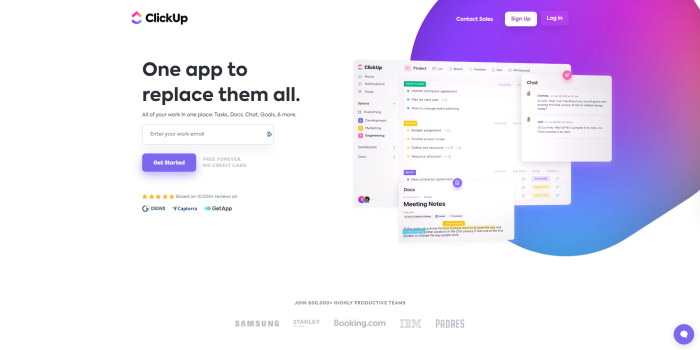
ClickUp: Simple and risk-free
ClickUp’s homepage CTA does two things well: it asks for just one piece of information (your email), and it removes the risk by making the first step free. The message is clear, the action is obvious, and there’s no reason to hesitate.
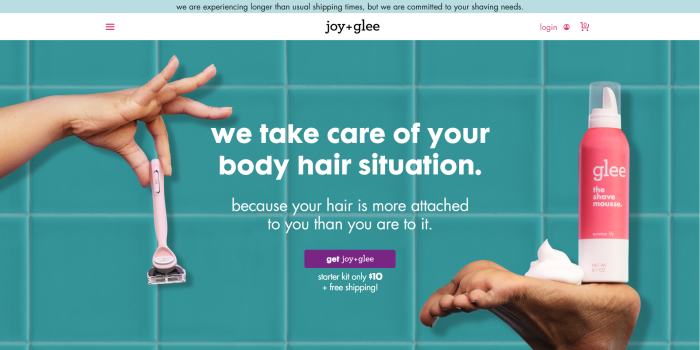
Joy + Glee - One message, one action
This subscription service for women has a homepage that does exactly what it should. One clear message. One clear action. No extra content competing for attention. It’s a masterclass in simplicity.
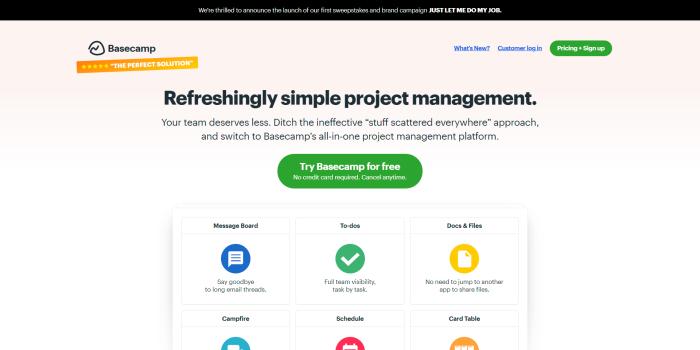
Basecamp - Clarity and confidence
Basecamp describes itself as ‘refreshingly simple project management’ and the homepage lives up to that. The CTA is confident, the sign-up feels easy, and the risk-free framing removes objections before they form.
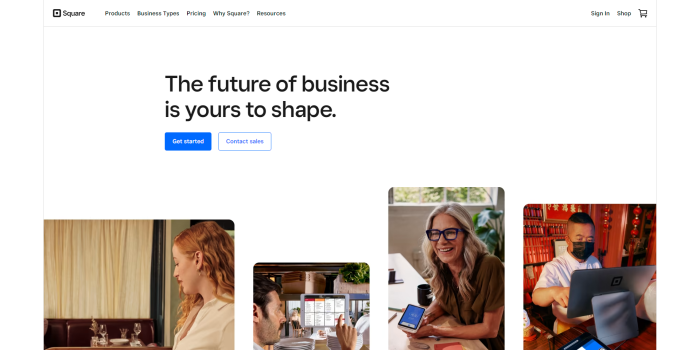
Square - Simple, but too vague
Square’s CTA is clean and visible, but the copy above assumes you already know who Square are and what problem they solve. For a visitor landing for the first time, there’s no context. The CTA button is doing all the work when the surrounding copy should be doing more.
Uber - Multiple CTAs, mixed results
Uber’s homepage offers three different CTAs for three different audiences: Drive, Eat, Ride. Each one is clear on its own, but stacking them together at the top of the screen makes the choice harder to see. A better approach would be to present a simple question first – ‘What are you looking for?’ and then show the relevant CTA based on the answer.

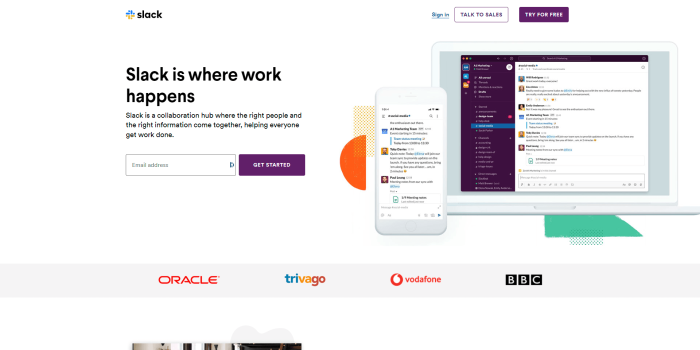
Slack - Value proposition in four words
‘Where Work Happens’ tells you everything you need to know. The CTA is anchored by a simple value proposition that immediately explains the benefit. You don’t need a paragraph – you need clarity.
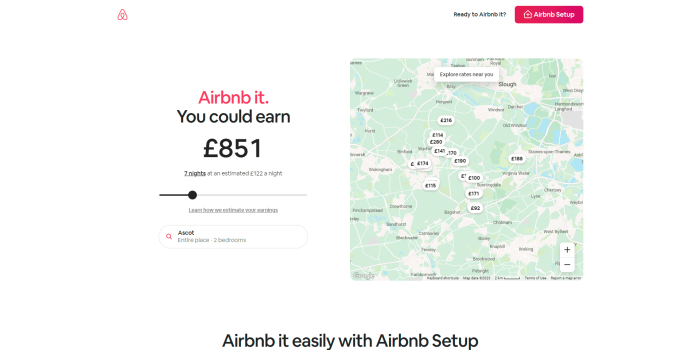
Airbnb - Personal and action-oriented
‘Become a Host’ is direct, personal and empowering. It speaks to the visitor’s motivation (earning money from their home) rather than Airbnb’s features. That’s the difference between a self-serving CTA and one that actually works.
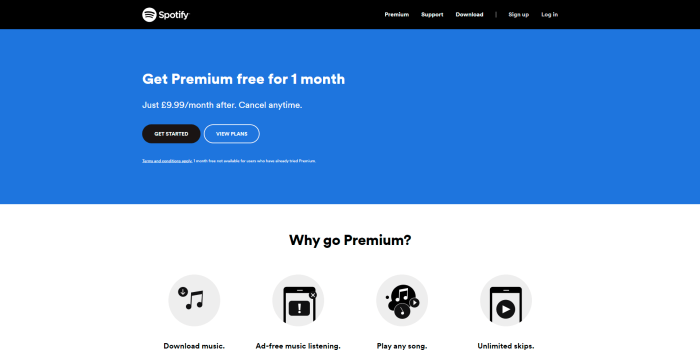
Spotify - Removing the risk
‘Get Premium free for 1 month’ removes the biggest barrier to sign-up: the commitment. By leading with the free trial, Spotify turns what could be a high-friction decision into a no-brainer.
Common CTA Mistakes to Avoid
1. Being vague
‘Click Here’ and ‘Learn More’ are two of the most common CTAs on the web and two of the least effective. They tell visitors nothing about what happens next or why they should bother. Replace them with something specific: ‘See Our WordPress Packages’ or ‘Book a Free Website Review’.
2. Too many CTAs competing for attention
Every page should have one primary CTA. When you put three or four equally prominent CTAs on a page, visitors don’t know where to look — so they often don’t click anything at all. Decide what the single most important action is for each page, and make that the focus.
3. CTAs that don't match the page
If someone is reading a blog post about WordPress care plans and your CTA is for web design, there’s a disconnect. The best CTAs are relevant to the content around them. They feel like a natural next step, not a random interruption.
4. Burying the CTA
Your CTA needs to be seen to be clicked. If it’s hidden at the bottom of a long page, or blends into the background, it won’t do its job. Place your primary CTA above the fold (visible without scrolling) and repeat it where relevant throughout longer pages.
5. Ignoring mobile users
More than half of website traffic is on mobile. If your CTA button is tiny, hard to tap, or disappears on a smaller screen, you’re losing potential enquiries. Make sure buttons are large enough to tap comfortably, text is legible, and any forms are short and simple.
What Makes a CTA Actually Work?
Be specific about what happens next
The best CTAs tell the visitor exactly what they’ll get. ‘Get Your Free Quote’ is better than ‘Contact Us’. ‘Book a 30-Minute Website Review’ is better than ‘Get in Touch’. Specificity removes uncertainty, and uncertainty is what stops people from clicking.
Reduce the perceived risk
Words like ‘free’, ‘no obligation’, and ‘no commitment’ work because they lower the barrier. If someone’s not sure they want to commit, a no-risk CTA gives them a reason to take the first step anyway.
Create some urgency but be honest
Urgency can increase clicks, but only if it’s genuine. ‘Limited spaces available’ or ‘responding to enquiries this week’ can work but if it’s not true, people notice. Be honest about timelines and availability.
Make it visually obvious
Your CTA should stand out on the page. Use a contrasting colour, enough white space around it, and a button that looks clickable. It shouldn’t require effort to find – it should draw the eye naturally.
Test and refine
There’s no universal ‘best’ CTA – what works depends on your audience and your offer. Try different wording, different colours, different placements. Google Analytics and heatmap tools like Hotjar can show you where visitors are (and aren’t) clicking.
Consistency Matters Too
Your CTAs should feel like part of your website, not something bolted on. That means using your brand colours, your tone of voice, and a consistent style across every page. A CTA that looks out of place, different font, clashing colour, odd sizing, undermines trust, even if the words are good.
Think of your CTAs as part of a journey. A visitor arrives, reads something useful, and your CTA guides them to the logical next step. When that journey feels coherent and intentional, conversions follow.
The Bottom Line
A weak CTA is one of the most common, and most fixable, problems on small business websites. You don’t need to overhaul your whole site. In many cases, improving the wording, visibility, and relevance of your CTAs can make a measurable difference to the number of enquiries you receive.
If you’re not sure whether your CTAs are working as hard as they should, we’re happy to take a look. A fresh pair of eyes often spots what’s being missed.
Ready to talk? Get in touch at hello@wearelens.co.uk or call 01344 968753.