You know that little preview card that appears when someone pastes a link into LinkedIn, Facebook, or WhatsApp? The one with an image, a title, and a short description? That’s not random. It’s something you can – and should – control.
What Is a Social Share Image?
When you share a link on social media, the platform pulls a preview from the website. This usually includes a title, a short description, and an image. That image is called an Open Graph image (or OG image if you want to sound technical at a dinner party).
By default, most websites either use whatever image happens to be on the page, pull in a logo that looks terrible at that size, or – in the worst cases – show nothing at all.
None of those are great first impressions.
A properly set social share image means every time someone shares your link, it looks intentional and on-brand. Think of it as a tiny billboard.
How Do You Know What Yours Looks Like Right Now?
Great question. Fortunately, both LinkedIn and Facebook have free tools that let you preview exactly how your link appears.
LinkedIn Post Inspector: LinkedIn’s Post Inspector lets you paste in your website URL and see exactly how it will look when shared on the platform. It also lets you refresh the cache, which is useful if you’ve recently made changes and want LinkedIn to pick them up.
You can find it here: LinkedIn Post Inspector
Facebook Sharing Debugger: Facebook’s Sharing Debugger does the same job but for Facebook (and Instagram, since they share the same system). Paste your URL in, hit Debug, and you’ll see the image, title, and description that Facebook will display.
You can find it here: Facebook Sharing Debugger
Both tools are free and you don’t need to be a developer to use them. Give them a go – you might be surprised by what you find.
Why Does It Matter?
Here’s the honest answer: because people make snap judgements.
If someone shares your website link and a blurry, irrelevant image appears alongside it, that’s what people see before they’ve even visited your site. It chips away at credibility before you’ve had a chance to say a word.
On the flip side, a sharp, well-branded image builds trust immediately. It signals that you care about the details and if you care about the details on a social share image, you probably care about them everywhere else too.
Can I See an Example?
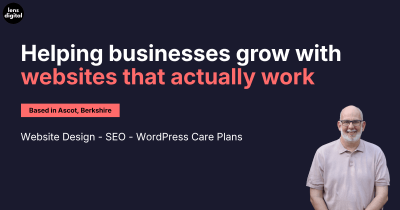
Absolutely. Try sharing our website and see what appears:
👉 https://wearelens.co.uk
Drop that link into a message, a LinkedIn post, or pop it into the Facebook Sharing Debugger above. That’s exactly the kind of result we’re talking about.
How Do You Change It?
If your website is built on WordPress (which most of our clients’ sites are), it’s usually a straightforward change. Plugins like Yoast SEO or Rank Math let you set a specific image for each page, or a default one for the whole site.
That said, every website is a little different and getting it right matters more than just uploading any old image.
Want Us to Sort It for You?
If you’ve run your website through those tools and you’re not happy with what you see, we can help. It’s the kind of thing we genuinely enjoy fixing – small change, big impact.
Get in touch with the Lens Digital team and we’ll take a look.