Ask most business owners about website accessibility and you’ll get the same reaction: a slight nod, a mental note to “look into it eventually,” and then… nothing. It gets filed under “nice to have,” somewhere between a company blog and a proper favicon.
We think that’s backwards.
Accessibility isn’t a favour you do for a small percentage of your visitors. Done properly, it’s one of the most underrated SEO tools available to you and most of the work overlaps with things you should already be doing.
Here’s the bit that surprises people: if your website is hard to use for someone with a screen reader, there’s a good chance it’s also hard for Google to understand. Search engines and screen readers “read” your site in a remarkably similar way following the structure, not just the pretty bits.
What accessibility actually means
Strip away the technical language and accessibility just means: can everyone use your website, regardless of how they’re using it?
That includes:
- Someone using a screen reader because they’re blind or have low vision
- Someone navigating with a keyboard only, not a mouse
- Someone with a slow connection who can’t wait for a bloated, unstructured page to load
- Someone with a cognitive difference who needs clear, logically ordered content
- And yes – Googlebot, which “reads” your site a bit like a very literal visitor with no eyes at all
That last one is the part most businesses miss.
Where accessibility and SEO are actually the same job
We’re not talking vague overlap here. These are specific, practical crossovers:
Heading structure. Screen readers let users jump between headings to navigate a page, the same way you’d skim a document. Google uses that same heading hierarchy to understand what your page is actually about. If your H1, H2, and H3 tags are a mess or worse, chosen for how big the text looks rather than what they mean – you’re confusing both audiences at once.
Alt text on images. This exists so a screen reader can describe an image to someone who can’t see it. It’s also literally how Google understands what an image contains, since it can’t “look” at a photo the way you can. Write good alt text once, and you’ve solved both problems.
Descriptive link text. A link that just says “click here” tells a screen reader user nothing about where it leads. It tells Google even less. “Read our WordPress Care Plans” does double duty – helpful for a human, and a small signal to search engines about what that page is about.
Logical reading order. If your page visually looks fine but the underlying code jumps around illogically, screen reader users experience a confusing, backwards version of your page. So does Google, which relies on that same order to work out what matters most.
None of this is exotic. It’s mostly things a well-built WordPress site should be getting right from day one.
Seeing it in practice: the WAVE tool
Rather than just tell you this stuff matters, we wanted to show you. We build every site with these principles in mind, so we ran a real example, our founder’s personal blog, through WAVE, a free accessibility evaluation tool built by WebAIM.
Here’s the summary it produced:
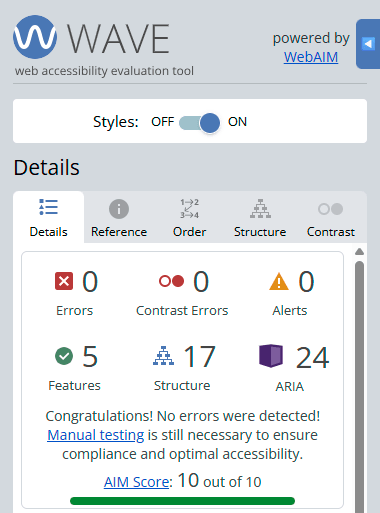
Zero errors. Zero contrast issues. A perfect AIM score. That’s not an accident — it’s the result of building the site with proper structure from the ground up.
What we find more useful, though, is WAVE’s Structure view, which shows exactly how the page is organised under the hood:
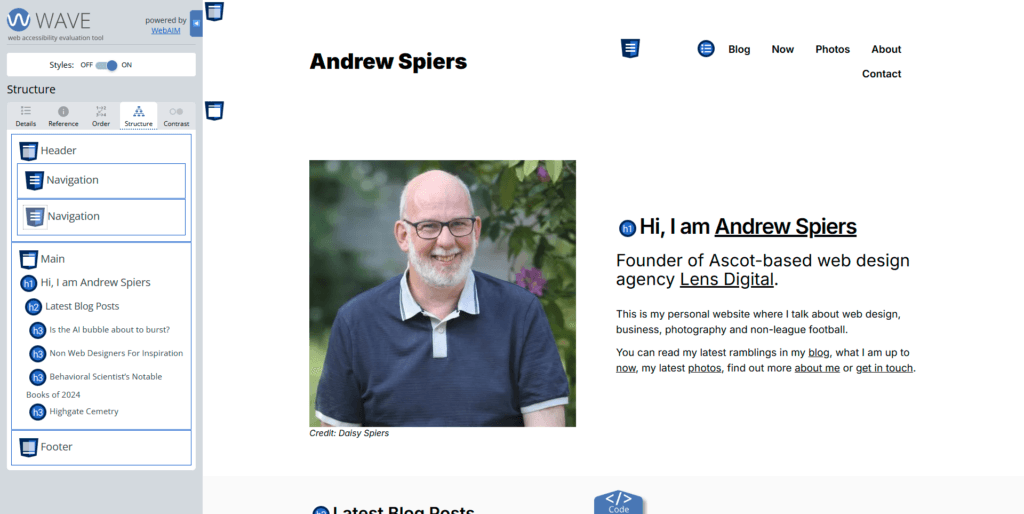
You can see a clean hierarchy: one H1, followed by properly nested H2s and H3s for the blog post list underneath. Nothing skipped, nothing out of order. This is exactly the kind of structure Google likes to see too – it’s a big part of how it decides what your page is really about.
And then there’s the Order view, which numbers every navigable element in the sequence a keyboard or screen reader user would actually encounter:
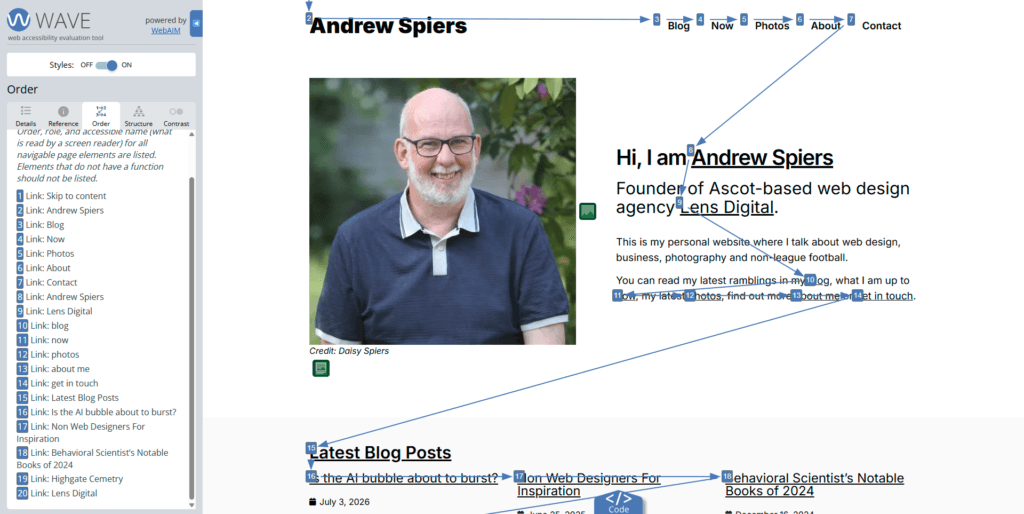
Notice the very first item: “Skip to content.” That’s a small, easily overlooked feature that lets keyboard and screen reader users jump straight past the navigation menu instead of tabbing through it every single time. It costs nothing to build in and makes a real difference to real people.
Why we're telling you this
We could talk about accessibility purely in terms of doing the right thing and honestly, that’s reason enough on its own. But we know most business owners are also thinking about traffic, rankings, and conversions. The good news is you don’t have to choose. Building an accessible site and building a well-optimised one are, in large part, the same task viewed from two different angles.
A few starting points if you want to check your own site:
- Run your homepage through WAVE – it’s free and takes seconds
- Check that you’ve got one, and only one, H1 per page
- Look at your image alt text – does it actually describe the image, or is it blank or stuffed with keywords?
- Read your link text out of context – does “click here” or “learn more” tell you anything useful?
If that sounds like more than you want to deal with, it’s exactly the kind of thing we build into every WordPress site we design. Accessibility isn’t a one-off audit; it’s something worth revisiting every time content gets added.
Get it right, and you’re not just doing right by your visitors. You’re handing Google a much easier job and that tends to show up in your rankings.
Want us to take a look at your site? Get in touch and we’ll run it through WAVE for you, free of charge.